Connections
Connections


Connection to Cue Player One can be made via either MIDI or OSC.
MIDI commands can come from light board consoles or microphone control programs like Palladium. Cue Player works in what is called "non-linear" mode, where cues are selected as they are played.
The MIDI commands are as follows, where n is the MIDI small device number and TT is the track or cue line number from Cue Player:
Emergency Stop - Bn.7B.00
Play - 9n.TT.00
Pause - 8n.TT.00
GoTo - Cn.TT
Stop - 8n.TT.01
Here is a screen shot of the Palladium setup:
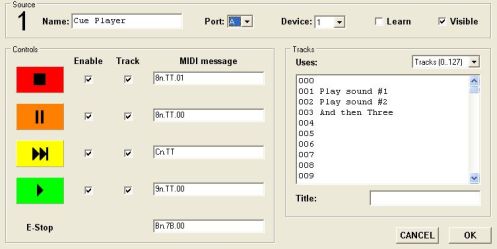
Use the "Set MIDI Input Port" Options menu selection to set the port. You will need to edit the cueplayerone.ini file if you need to change the channel number (device 1) from 0.
OSC (Open Sound Control) commands come in on the listening port number defined at the bottom of the Preferences window. Valid commands are: Play, PlayXX, and GotoXX where XX is the cue number. Fades and pauses are better handled by control cues within the cue list and given their own play command. Function keys can also be simulated when "fx" is received
Cue Player One can be integrated with the popular program 'TheatreMix' to allow it to trigger Cue Player cues. Please look at the TheatreMix manual under 'Playback Cue Control' and 'Show Setup > Playback...' for details on how to use. The 'Sound Options' menu line of 'Configure for TheatreMix' will set the OSC parameters correctly. The menu item will need to be checked again after a CP One restart.
TheatreMix listens to port 32000 for Control OSC cues meant for it, like /go and /jump #. A mixer has to be connected for those cues to be effective. It uses port 55050 to send commands to CP One, set Preferences for listening accordingly.